How much does an Xfinity modem cost?
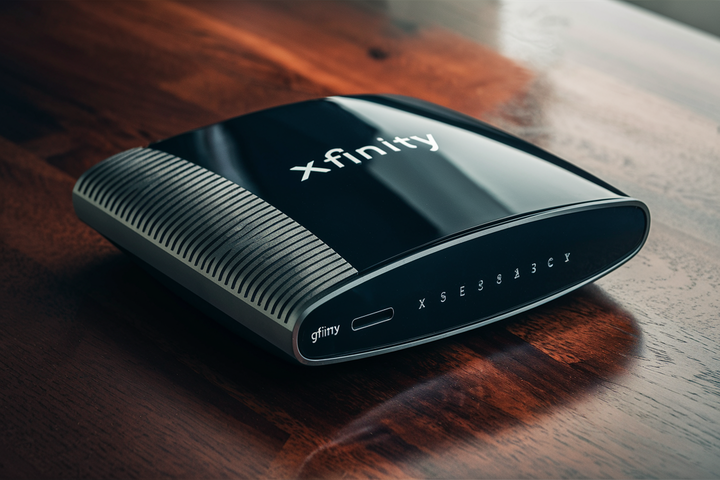
Understanding the cost of an Xfinity modem is crucial for managing your internet expenses. This guide breaks down the pricing, rental fees, and purchasing options, empowering you to make the most informed decision for your home internet setup in 2025-26.
Understanding Xfinity Modem Costs
When you sign up for Xfinity internet service, one of the primary considerations beyond the monthly internet plan price is the equipment you'll use to connect. This equipment typically includes a modem, and sometimes a separate router or a combination modem/router unit (often called a gateway). The cost associated with this hardware can significantly impact your overall monthly internet expenditure. Xfinity, like many Internet Service Providers (ISPs), offers two main avenues for obtaining a modem: renting one from them or purchasing your own compatible device. Each option comes with its own set of financial implications, and understanding these is key to optimizing your internet budget. In 2025-26, the landscape of ISP equipment pricing remains competitive, with both rental fees and purchase prices for modems fluctuating based on technology, features, and market demand. This comprehensive guide will delve into the intricacies of Xfinity modem costs, helping you navigate the options and make a decision that aligns with your financial goals and internet needs.
The Role of a Modem
Before diving into costs, it's essential to grasp what a modem does. A modem (modulator-demodulator) is the device that connects your home network to your Internet Service Provider's network. It translates the digital signals from your computer or router into analog signals that can travel over cable lines, and vice-versa. Without a modem, your home devices would have no way to access the internet. For Xfinity, which primarily uses coaxial cable lines (DOCSIS technology), you need a DOCSIS-compatible modem.
Xfinity Equipment Options
Xfinity provides its customers with a few primary equipment choices:
- Xfinity Rental Modem/Gateway: This is the most straightforward option. Xfinity provides you with their branded modem or gateway (a device that combines a modem and router). You pay a monthly rental fee for this equipment.
- Purchase Your Own Modem: You can opt to buy a modem that is on Xfinity's approved list. This is a one-time purchase, and you avoid monthly rental fees.
- Purchase an Xfinity Gateway: In some cases, Xfinity might offer you the option to purchase their gateway outright, though this is less common than the rental or BYOD (Bring Your Own Device) approach.
The decision between renting and buying is often the most significant factor in determining your long-term Xfinity modem costs.
Xfinity Modem Rental Fees: The Monthly Drain
Renting a modem from Xfinity is the path of least resistance when setting up internet service. You typically receive the equipment directly from Xfinity, and installation is often straightforward, especially if it's a self-install kit. However, this convenience comes at a recurring cost. In 2025-26, Xfinity's modem rental fees can vary depending on your location, the specific plan you choose, and the type of equipment provided. While Xfinity aims to keep these fees competitive, they represent a continuous expenditure that adds up significantly over time.
Average Monthly Rental Costs (2025-26)
Based on current trends and projections for 2025-26, you can expect Xfinity modem rental fees to range from approximately $15 to $25 per month. This figure often includes a modem-only device. If you opt for an Xfinity gateway, which combines a modem and a Wi-Fi router, the rental fee might be higher, potentially ranging from $25 to $35 per month. These prices are subject to change and can vary by region. For example, a customer in a densely populated urban area might see slightly different pricing than someone in a suburban or rural location. It's always best to confirm the exact rental fee with Xfinity directly for your specific service address.
What Does the Rental Fee Cover?
When you rent an Xfinity modem or gateway, the monthly fee typically covers:
- The Hardware: You are essentially leasing the physical device.
- Maintenance and Support: Xfinity usually provides support for their rented equipment. If the modem malfunctions or becomes obsolete, they will typically replace it at no additional charge (though sometimes a service call fee might apply).
- Upgrades: If Xfinity releases newer, faster modem technology, they may offer upgrades to customers who rent their equipment, ensuring you can take full advantage of their network speeds.
The Long-Term Impact of Rental Fees
While the monthly rental fee might seem manageable initially, its cumulative effect over the years can be substantial. Let's consider an example:
If you rent an Xfinity modem for $20 per month, over a single year, you'll spend $240 on rental fees. Over three years, that amounts to $720. Over five years, the cost climbs to $1200. These figures highlight that the total cost of renting can quickly surpass the price of purchasing a high-quality modem outright. This is a critical point for consumers to consider when evaluating their long-term internet expenses.
Potential Hidden Fees
While Xfinity is generally transparent about its rental fees, it's wise to be aware of potential additional charges. These might include:
- Installation Fees: If you require a professional installation, there might be a one-time fee.
- Service Call Fees: If a technician needs to visit your home to troubleshoot issues with the rented equipment, a service call fee could be applied.
- Late Payment Fees: Standard late payment penalties apply if your monthly bill isn't paid on time.
Always review your Xfinity service agreement carefully to understand all potential charges associated with rented equipment.
Buying Your Own Xfinity-Compatible Modem: The Long-Term Investment
Opting to purchase your own modem is a popular strategy for many Xfinity customers looking to save money in the long run. This approach involves buying a modem that meets Xfinity's specifications and then activating it on their network. While it requires an upfront investment, it eliminates the recurring monthly rental fees, leading to significant savings over the lifespan of the modem. In 2025-26, the availability of high-performance, DOCSIS 3.1 modems has increased, offering consumers more choices and better value.
Benefits of Purchasing Your Own Modem
The advantages of owning your modem extend beyond just cost savings:
- Significant Long-Term Savings: As demonstrated in the rental section, avoiding monthly fees can save you hundreds, if not thousands, of dollars over several years.
- Greater Equipment Choice: You can select a modem that best suits your specific needs in terms of speed, features, and brand preference. This allows for greater customization of your home network.
- No Monthly Fees: Once purchased, the modem is yours. You are free from recurring rental charges.
- Potential for Faster Speeds: You can often purchase a modem that supports higher speeds than what Xfinity might provide as a standard rental unit, especially if you have a higher-tier internet plan.
- Flexibility: If you move or switch ISPs (though less common with Xfinity due to their widespread coverage), you can take your modem with you, provided it's compatible with the new provider.
Cost of Purchasing a Modem (2025-26)
The price of a DOCSIS 3.1 compatible modem can vary widely based on its capabilities, brand, and features. In 2025-26, you can expect to pay anywhere from $70 to $250 or more for a new, high-quality modem. Here's a general breakdown:
- Entry-Level DOCSIS 3.0 Modems: While becoming less common for higher speed tiers, these might range from $50 to $100. They are suitable for lower internet speeds (e.g., up to 300 Mbps).
- Mid-Range DOCSIS 3.1 Modems: These are the sweet spot for most users, offering compatibility with speeds up to 1 Gbps and beyond. Prices typically fall between $100 and $180.
- High-End DOCSIS 3.1 Modems: For users with gigabit-plus internet plans or those who want the absolute latest technology and future-proofing, prices can range from $180 to $250+. These often feature advanced chipsets and better performance under heavy load.
Brands like Netgear, Motorola, ARRIS, and TP-Link are popular choices, and their pricing reflects their market position and product features.
Ensuring Compatibility with Xfinity
This is the most critical step when buying your own modem. Not all modems work with Xfinity. Xfinity maintains a list of approved modems on their website. It's imperative to check this list before making a purchase. The list is usually categorized by DOCSIS version (e.g., DOCSIS 3.0, DOCSIS 3.1) and the maximum internet speeds the modem is certified to support. Using a modem not on the approved list can result in connection issues or an inability to activate the service.
You can typically find the official Xfinity-compatible modem list by searching "Xfinity compatible modems" on their website or by asking an Xfinity representative. Look for modems that explicitly state compatibility with Xfinity or Comcast.
Activation Process for Purchased Modems
Once you've purchased a compatible modem, activating it on the Xfinity network is usually a straightforward process:
- Connect the Modem: Plug your new modem into a live coaxial cable outlet and connect it to power.
- Connect a Computer: Connect a computer directly to the modem using an Ethernet cable.
- Access the Xfinity Activation Portal: Open a web browser on the connected computer. You should be automatically redirected to the Xfinity activation page. If not, you may need to navigate to xfinity.com/activate.
- Follow On-Screen Instructions: The portal will guide you through the activation process. You'll likely need to provide your Xfinity account information. The system will detect your new modem's MAC address and provision it for your service.
- Restart the Modem: The modem may restart several times during activation.
If you encounter any issues, Xfinity's customer support or online troubleshooting guides can assist you.
Factors Influencing Modem Cost
The price you pay for a modem, whether renting from Xfinity or buying your own, is influenced by several key factors. Understanding these can help you make a more informed decision and potentially find better value.
DOCSIS Version
DOCSIS (Data Over Cable Service Interface Specification) is the standard used by cable operators to deliver high-speed internet. The version of DOCSIS your modem supports is a primary determinant of its speed capabilities and, consequently, its cost.
- DOCSIS 3.0: This is an older standard but still sufficient for many internet plans. DOCSIS 3.0 modems use channel bonding to aggregate multiple channels, offering speeds typically up to 300-600 Mbps. They are generally the most affordable option.
- DOCSIS 3.1: This is the current standard for high-speed internet. DOCSIS 3.1 modems are significantly faster and more efficient, capable of supporting speeds of 1 Gbps and beyond. They utilize OFDM (Orthogonal Frequency-Division Multiplexing) technology for better performance. DOCSIS 3.1 modems are more expensive due to their advanced technology.
For most Xfinity plans offering speeds above 300 Mbps, a DOCSIS 3.1 modem is highly recommended, if not required, to achieve optimal performance. This means a higher upfront cost if you're buying, or potentially a higher rental fee if Xfinity provides a DOCSIS 3.1 gateway.
Channel Bonding
Modems use channels to communicate with the ISP. Channel bonding allows a modem to use multiple upstream and downstream channels simultaneously, increasing its capacity and speed. The number of bonded channels a modem supports is a good indicator of its performance. For DOCSIS 3.0, you'll see specifications like 8x4, 16x4, 24x8, or 32x8, where the first number indicates downstream channels and the second indicates upstream channels. More bonded channels generally mean better performance and a higher price point for purchased modems.
Ethernet Ports
Modems typically have at least one Ethernet port to connect to a router or directly to a computer. Some higher-end modems or gateways might offer multiple Ethernet ports, which can be useful for wired connections to multiple devices without a separate switch. The number and speed (Gigabit Ethernet is standard) of these ports can slightly influence the price.
Wi-Fi Capabilities (for Gateways)
If you are considering an Xfinity gateway (a combined modem and router), its Wi-Fi capabilities will significantly impact its cost. Features like Wi-Fi 6 (802.11ax) or Wi-Fi 6E offer faster speeds, better range, and improved performance in crowded wireless environments compared to older standards like Wi-Fi 5 (802.11ac). A gateway with the latest Wi-Fi technology will command a higher rental fee or purchase price.
Brand and Features
As with most electronics, brand reputation and specific features play a role in pricing. Premium brands known for reliability and advanced features may cost more. Some modems might include additional features like built-in security software, advanced parental controls, or specific QoS (Quality of Service) settings, which can add to the overall cost if you're buying.
New vs. Refurbished Equipment
When purchasing a modem, you'll often see options for both new and refurbished units. Refurbished modems are pre-owned devices that have been inspected, repaired (if necessary), and restored to full working condition. They are typically sold at a lower price than new ones. While refurbished can be a cost-effective option, ensure you purchase from a reputable seller and check the warranty terms. Xfinity's rental equipment is often refurbished or previously used.
Xfinity Modem vs. Router Cost Comparison
It's common for users to confuse modems and routers, or to lump them together as "internet equipment." However, they serve distinct functions, and understanding their individual costs is important. Xfinity often provides gateways that combine both functions, which can simplify setup but also obscure individual component costs.
The Modem's Role
As discussed, the modem is the gateway between your home network and the internet service provider's network. It translates signals and establishes the internet connection. The cost of a modem is directly tied to its ability to communicate with the ISP's infrastructure (e.g., DOCSIS version, channel bonding).
The Router's Role
A router, on the other hand, creates your local network (LAN) within your home. It assigns IP addresses to your devices, manages traffic between them, and allows multiple devices to share the single internet connection provided by the modem. A router also provides Wi-Fi connectivity, enabling wireless access for your smartphones, laptops, smart TVs, and other devices.
Cost of Renting vs. Buying a Modem
This is the core of our discussion. As established:
- Renting from Xfinity: Typically $15-$25/month for a modem, potentially $25-$35/month for a gateway. Over 3 years, this is $540-$1260+.
- Buying Your Own Modem: One-time cost of $70-$250+.
The long-term savings of buying your own modem are clear.
Cost of Buying a Router
If you buy your own modem, you'll likely need a separate router (unless your purchased modem is a gateway). The cost of a standalone router varies significantly:
- Basic Routers: For simple needs and smaller homes, you might find a decent router for $50 to $100. These typically support Wi-Fi 5 (802.11ac).
- Mid-Range Routers: Offering better performance, range, and Wi-Fi 6 support, these can cost between $100 and $200.
- High-End Routers: For large homes, multiple users, heavy streaming, gaming, or Wi-Fi 6E/Wi-Fi 7, prices can range from $200 to $500+. These often feature mesh capabilities for extended coverage.
Cost of Xfinity Gateways
Xfinity gateways combine modem and router functionalities. When you rent one, the fee covers both. If Xfinity offers the option to purchase a gateway, the price will be significantly higher than a standalone modem, often ranging from $200 to $300 or more, reflecting the integrated router technology.
The Cost Advantage of Separation
For many users, purchasing a separate, high-quality modem and a separate, high-quality router offers the best of both worlds:
- Optimized Performance: You can choose a modem specifically designed for DOCSIS 3.1 and a router optimized for Wi-Fi performance, rather than a compromise device.
- Cost-Effectiveness: While the initial outlay might be higher than renting a basic modem, buying a good modem ($100-$200) and a good router ($100-$200) can still be more economical over 3-5 years than renting an Xfinity gateway.
- Flexibility: You can upgrade your router independently of your modem if Wi-Fi technology advances or your needs change, without needing to replace the modem.
For example, buying a $150 DOCSIS 3.1 modem and a $150 Wi-Fi 6 router means a $300 upfront cost. Over three years, this is $300. Renting an Xfinity gateway at $30/month would cost $1080 over the same period. The savings are substantial.
Calculating Your Total Cost of Ownership
To make the most financially sound decision regarding your Xfinity modem, it's essential to calculate the total cost of ownership (TCO) for both renting and buying. This involves looking beyond the immediate price and considering the expenses over a realistic timeframe, typically 3 to 5 years, which is a common lifespan for internet equipment.
Scenario 1: Renting an Xfinity Modem
Let's assume an average monthly rental fee of $20 per month for a standard Xfinity modem. We'll calculate the TCO over 3 and 5 years.
- Monthly Cost: $20
- Annual Cost: $20/month * 12 months = $240
- 3-Year TCO: $240/year * 3 years = $720
- 5-Year TCO: $240/year * 5 years = $1200
If you rent an Xfinity gateway with Wi-Fi capabilities, the monthly fee might be higher, say $30 per month.
- Monthly Cost: $30
- Annual Cost: $30/month * 12 months = $360
- 3-Year TCO: $360/year * 3 years = $1080
- 5-Year TCO: $360/year * 5 years = $1800
These figures don't include potential one-time installation or service call fees, which could add to the total.
Scenario 2: Buying Your Own Modem
Let's assume you purchase a high-quality DOCSIS 3.1 modem for $150. We'll calculate the TCO over the same 3 and 5-year periods.
- Upfront Purchase Cost: $150
- Monthly Cost: $0 (for the modem)
- Annual Cost: $0
- 3-Year TCO: $150 (upfront cost) + $0 (monthly) = $150
- 5-Year TCO: $150 (upfront cost) + $0 (monthly) = $150
This calculation assumes the modem remains functional and compatible for the entire period. If you need to replace it sooner, that cost would be added.
Scenario 3: Buying a Modem and Router Separately
This is a common and often recommended approach. Let's assume:
- Purchased Modem Cost: $150 (DOCSIS 3.1)
- Purchased Router Cost: $150 (Wi-Fi 6)
- Total Upfront Cost: $150 + $150 = $300
- Monthly Cost: $0 (for modem and router)
- Annual Cost: $0
- 3-Year TCO: $300 (upfront cost) + $0 (monthly) = $300
- 5-Year TCO: $300 (upfront cost) + $0 (monthly) = $300
This scenario provides a robust home network with excellent Wi-Fi capabilities for a significantly lower TCO than renting.
Comparison Table of Ownership Costs
Here's a summary table for clarity:
| Scenario | Upfront Cost | Monthly Cost | 3-Year TCO | 5-Year TCO |
|---|---|---|---|---|
| Rent Xfinity Modem ($20/mo) | $0 | $20 | $720 | $1200 |
| Rent Xfinity Gateway ($30/mo) | $0 | $30 | $1080 | $1800 |
| Buy Own Modem ($150) | $150 | $0 | $150 | $150 |
| Buy Modem ($150) + Router ($150) | $300 | $0 | $300 | $300 |
Factors Affecting TCO
- Modem Lifespan: The actual lifespan of your purchased modem. Technology evolves, and you might want to upgrade sooner than 5 years.
- Internet Speed Changes: If you upgrade your internet speed tier, you might need a new modem to support it.
- Equipment Failure: While less common with quality hardware, purchased equipment can fail, incurring replacement costs.
- ISP Policy Changes: ISPs can change their rental fees or policies.
Despite these variables, the TCO calculations consistently show that buying your own equipment is the more economical choice for most users over the medium to long term.
When to Buy vs. Rent an Xfinity Modem
The decision between buying your own modem and renting one from Xfinity isn't always black and white. Several factors should influence your choice. By carefully considering your specific circumstances, you can determine which option best suits your needs and budget.
Reasons to Rent from Xfinity
Renting an Xfinity modem or gateway might be the better option for you if:
- You Prefer Simplicity and Convenience: Xfinity handles the equipment selection, delivery, and often provides straightforward self-installation instructions. If you don't want to research compatible modems or deal with activation yourself, renting is easier.
- You Don't Plan to Stay with Xfinity Long-Term: If you're in a temporary living situation or anticipate switching ISPs within a year or two, the upfront cost of buying a modem might not be recouped. Renting avoids this sunk cost.
- Your Internet Speed is Low: If you have a very basic internet plan (e.g., under 100 Mbps), Xfinity might provide a simple, low-cost modem for rent, and the cost savings of buying might be minimal. However, even for lower speeds, buying can still be cheaper over time.
- You Want Guaranteed Compatibility and Support: When you rent, Xfinity ensures the equipment is compatible and provides technical support for it. If it fails, they replace it. This peace of mind can be valuable to some users.
- You Need the Latest Technology Immediately: Xfinity might offer their latest gateway models to renters, which may not be available for purchase on the open market immediately.
Reasons to Buy Your Own Modem
Purchasing your own modem is generally the recommended path for most users, especially if:
- You Plan to Stay with Xfinity for Several Years: As the TCO calculations show, the savings over 3-5 years are substantial. The initial investment is quickly offset by the elimination of monthly fees.
- You Have a Higher-Tier Internet Plan: If you subscribe to Xfinity's faster internet speeds (e.g., 300 Mbps, 500 Mbps, 1 Gbps, or higher), buying a DOCSIS 3.1 modem is almost always more cost-effective and ensures you can achieve the advertised speeds.
- You Want More Control Over Your Network: Owning your modem and router gives you more flexibility in choosing specific models, features, and brands that best suit your needs (e.g., advanced Wi-Fi settings, parental controls, specific security features).
- You Want to Avoid Recurring Fees: The psychological and financial benefit of owning an asset and not paying a monthly fee for it is significant for many.
- You Want to Future-Proof Your Setup: You can select a modem with specifications that exceed your current needs, ensuring it remains compatible with future speed increases or technology upgrades from Xfinity.
Considerations for Modems, Routers, and Gateways
It's important to reiterate the distinction:
- Modem Only: You'll need a separate router for Wi-Fi. This is often the most flexible and cost-effective long-term solution.
- Gateway (Modem + Router): This is a single device. Xfinity rents these, and you can sometimes buy them. Renting a gateway is usually more expensive than renting a modem-only device. Buying a high-end gateway can be costly upfront.
If you decide to buy, purchasing a high-quality DOCSIS 3.1 modem and a separate, capable Wi-Fi 6 or Wi-Fi 6E router generally offers the best balance of performance, flexibility, and long-term value.
The Break-Even Point
A simple way to think about it is the break-even point. If you rent a modem for $20 per month, and buy one for $150:
- You'll pay $150 upfront.
- You'll save $20 each month.
- After 7.5 months ($150 / $20), you will have recouped your initial investment.
Any time beyond 7.5 months, you are saving money by owning your modem. For most people, this is well within the typical usage period for internet equipment.
Finding the Best Xfinity Modem Deals
Whether you're looking to buy a modem or are trying to understand the costs associated with renting from Xfinity, there are strategies to find the best value. The market for modems is competitive, and deals can often be found if you know where to look.
Tips for Buying a Modem
- Check Xfinity's Approved Modem List First: This is non-negotiable. Ensure any modem you consider is on their official list for compatibility.
- Compare Prices Across Retailers: Major online retailers like Amazon, Best Buy, Newegg, and Walmart are good places to start. Prices can fluctuate, so compare them before purchasing.
- Look for Sales and Promotions: Keep an eye out for holiday sales (Black Friday, Cyber Monday), back-to-school promotions, or manufacturer-specific discounts.
- Consider Refurbished or Open-Box Items: Reputable sellers often offer certified refurbished or open-box modems at a significant discount. Ensure they come with a warranty.
- Buy DOCSIS 3.1 for Future-Proofing: Even if your current plan doesn't require it, a DOCSIS 3.1 modem will likely support future speed upgrades from Xfinity and is essential for plans above 300-400 Mbps.
- Read Reviews: Before buying, read user reviews to gauge reliability, performance, and ease of setup.
- Don't Overbuy: Choose a modem that matches or slightly exceeds your current internet speed tier. Buying the absolute top-of-the-line modem might be overkill if you have a modest internet plan.
Negotiating with Xfinity
While Xfinity's modem rental fees are generally set, there might be opportunities to reduce your overall internet bill:
- Bundle Services: If you're also considering TV or phone services, bundling can sometimes lead to discounts on equipment or the overall package.
- Ask About Promotions: When signing up or renewing your service, ask if there are any current promotions on equipment rentals or internet plans.
- Loyalty Discounts: If you've been a long-time customer, inquire about loyalty discounts.
- Be Prepared to Switch: Sometimes, mentioning that you're considering other providers can prompt Xfinity to offer better deals.
- Consider Your Own Equipment: Clearly state that you intend to purchase your own modem. This removes their equipment rental revenue, and they might be more willing to offer a discount on the internet service itself to retain you as a customer.
Understanding Gateway Costs
If Xfinity pushes their gateway (modem/router combo), be aware that renting these is typically more expensive than renting a modem-only device. If you are considering a gateway, compare the rental cost to purchasing a separate modem and router. Often, buying your own combination offers better value and performance.
Stay Informed About Technology
The world of internet technology is always evolving. Keep an eye on:
- DOCSIS Standards: DOCSIS 4.0 is on the horizon, promising even higher speeds. While not widely available for consumer purchase in 2025-26, understanding these advancements helps in making long-term equipment decisions.
- Wi-Fi Standards: Wi-Fi 7 is starting to emerge, offering significant speed and capacity improvements over Wi-Fi 6E.
By staying informed, you can make purchase decisions that will serve you well for years to come.
Conclusion: Making the Right Choice
Navigating the cost of an Xfinity modem in 2025-26 boils down to a clear financial decision: rent or buy. While renting offers immediate convenience and Xfinity's support, the cumulative monthly fees quickly outpace the one-time investment of purchasing your own compatible modem. Our analysis consistently shows that buying your own DOCSIS 3.1 modem, often paired with a separate Wi-Fi router, provides significant long-term savings and greater control over your home network. By carefully calculating the total cost of ownership over a 3-5 year period, the advantage of purchasing becomes undeniable for most Xfinity subscribers. Always verify compatibility with Xfinity's approved list and shop around for the best deals on new or refurbished equipment to maximize your investment. Ultimately, an informed decision today will lead to a more affordable and potentially better-performing internet experience tomorrow.