How does my internet get to my house?
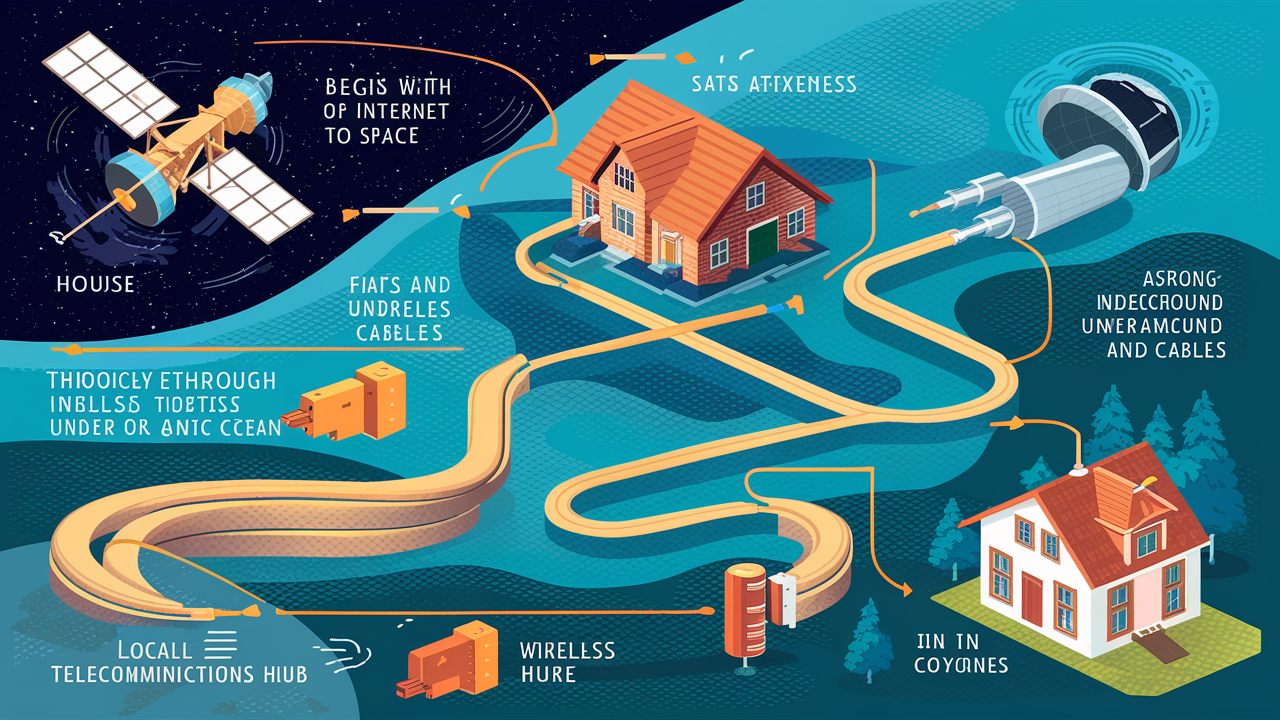
Understanding how internet service reaches your home is crucial for troubleshooting and appreciating the technology. This guide demystifies the journey of data from global networks to your living room, explaining the infrastructure and processes involved in delivering seamless connectivity.
Introduction: The Invisible Journey of Data
Ever wondered how a simple click on your computer or tap on your smartphone instantly brings information from across the globe to your screen? The process is a marvel of modern engineering, involving a complex network of physical infrastructure and digital protocols. This article delves deep into the fascinating journey of how your internet gets to your house, explaining the technologies, providers, and steps involved in connecting you to the digital world.
The Internet Service Provider (ISP): Your Gateway to the Web
At the heart of your internet connection is the Internet Service Provider (ISP). These companies are the gatekeepers, the entities that have invested in the vast infrastructure required to bring internet access to your neighborhood and, ultimately, your home. Think of them as the utility companies for the digital age. Without an ISP, your home would be isolated from the global network.
ISPs range from massive multinational corporations to smaller, regional providers. They operate by purchasing bandwidth from larger backbone providers and then distributing it to their customers. This distribution happens through a complex network of fiber optic cables, copper wires, and wireless transmitters. The type of service you subscribe to – whether it's high-speed fiber or a more basic DSL connection – dictates the specific infrastructure your ISP uses to reach your home.
In 2025, the ISP landscape is increasingly competitive, with many providers vying for market share. The choice of ISP often depends on geographical location, as not all providers offer service everywhere. Factors like speed, data caps, and price are key considerations for consumers. Understanding your ISP's role is the first step in comprehending how internet service is delivered.
Types of Internet Connections: The Physical Pathways
The physical medium through which data travels from the ISP's network to your home is perhaps the most critical component of your internet connection. Different technologies offer varying speeds, reliability, and costs. Here's a breakdown of the most common types:
Fiber Optic Internet: The Speed of Light
Fiber optic internet is widely considered the gold standard for speed and reliability. It uses thin strands of glass or plastic to transmit data as pulses of light. These light signals travel at incredible speeds, approaching the speed of light itself, making fiber optic connections significantly faster than traditional copper-based technologies. In 2025, fiber optic deployment continues to expand rapidly, especially in urban and suburban areas, driven by the demand for high-bandwidth applications like 4K streaming, online gaming, and remote work.
Key characteristics of Fiber Optic Internet:
- Speed: Offers symmetrical download and upload speeds, often reaching gigabits per second (Gbps).
- Reliability: Less susceptible to interference from electromagnetic signals and weather conditions compared to copper.
- Latency: Very low latency, which is crucial for real-time applications like video conferencing and online gaming.
- Cost: Historically more expensive to install, but prices are becoming more competitive as deployment increases.
The infrastructure involves laying fiber optic cables from the ISP's central office, through neighborhood distribution points, and often directly to individual homes (known as Fiber-to-the-Home or FTTH). This direct connection is what enables its superior performance.
Cable Internet: Leveraging Existing Infrastructure
Cable internet utilizes the same coaxial cable network that delivers cable television to homes. This existing infrastructure has made it a popular and widely available option for many years. Data is transmitted over these cables using radio frequency (RF) signals. While cable internet can offer high download speeds, upload speeds are typically much lower than download speeds, a characteristic known as asymmetrical bandwidth.
Key characteristics of Cable Internet:
- Speed: Offers good download speeds, often in the hundreds of megabits per second (Mbps), with upload speeds typically a fraction of that.
- Availability: Widely available in most urban and suburban areas due to existing cable TV networks.
- Shared Bandwidth: Bandwidth is shared among users in a neighborhood. During peak usage times, speeds can sometimes slow down.
- Cost: Generally more affordable than fiber optic, making it a popular choice for budget-conscious consumers.
The technology has evolved significantly, with DOCSIS (Data Over Cable Service Interface Specification) standards continually improving speeds and efficiency. The latest DOCSIS 4.0 standard, becoming more prevalent in 2025-26, aims to deliver multi-gigabit speeds and symmetrical upload capabilities, narrowing the gap with fiber.
DSL Internet: A Classic Connection
Digital Subscriber Line (DSL) internet uses existing copper telephone lines to transmit data. It works by utilizing frequencies on the phone line that are higher than those used for voice calls, allowing for simultaneous internet and phone service. DSL speeds are highly dependent on the distance from the user's home to the ISP's central office or local exchange. The further away you are, the slower the connection.
Key characteristics of DSL Internet:
- Speed: Speeds vary widely, from a few Mbps to over 100 Mbps for newer VDSL (Very-high-bit-rate DSL) variants. Upload speeds are typically much lower than download speeds.
- Availability: Available anywhere there is a traditional phone line, making it a viable option in many rural areas where other broadband options are limited.
- Reliability: Generally reliable, but susceptible to line quality and distance issues.
- Cost: Often one of the most affordable options.
While DSL has been surpassed in speed by fiber and cable, it remains a crucial service for many, especially in areas with limited broadband infrastructure. Ongoing upgrades to DSL technology continue to offer incremental improvements.
Satellite Internet: Reaching the Remote
Satellite internet is a solution for areas where terrestrial broadband options are unavailable, such as remote rural locations or islands. It involves a satellite dish installed at the user's home that communicates with a satellite in orbit, which in turn communicates with a ground station connected to the internet. In 2025, companies like Starlink are revolutionizing this space with low-Earth orbit (LEO) satellites, offering significantly lower latency and higher speeds than traditional geostationary satellites.
Key characteristics of Satellite Internet:
- Availability: The primary advantage is its global availability, reaching even the most isolated locations.
- Speed: LEO satellite internet (e.g., Starlink) offers speeds comparable to DSL and some cable plans, with significantly reduced latency. Traditional geostationary satellite internet is much slower with high latency.
- Latency: Traditional satellite internet has very high latency (hundreds of milliseconds) due to the vast distance to the satellite. LEO satellite internet dramatically reduces this.
- Data Caps and Throttling: Historically, satellite internet often came with strict data caps and throttling, though this is improving with newer technologies.
- Weather Dependency: Performance can be affected by heavy rain, snow, or clouds.
The rise of LEO constellations is a game-changer, making satellite internet a more viable option for a wider range of users seeking broadband in underserved areas.
Fixed Wireless Internet: The Airwaves Approach
Fixed wireless internet uses radio waves to connect a fixed location (like your home) to an internet source, typically a tower. It's a good alternative in areas where laying cable is impractical or too expensive. A small antenna is installed on your home, pointing towards the provider's tower. This technology is becoming increasingly competitive, especially with the rollout of 5G networks.
Key characteristics of Fixed Wireless Internet:
- Speed: Speeds can vary widely, from basic broadband to multi-gigabit speeds with 5G fixed wireless.
- Availability: Available in areas with line-of-sight to a provider's tower, often serving suburban and rural communities.
- Installation: Requires a clear line of sight to the tower.
- Cost: Can be competitive with cable and DSL.
5G fixed wireless, in particular, is poised to offer speeds that rival wired connections, providing a robust wireless alternative for home internet.
The "Last Mile": Bridging the Gap to Your Doorstep
The "last mile" refers to the final leg of the journey for internet signals – the connection from the ISP's local network infrastructure to your individual home. This is often the most challenging and expensive part of delivering internet service, especially in densely populated urban areas or vast rural landscapes. The physical pathways used in the last mile are critical to the performance and reliability of your connection.
Underground Cables: The Backbone of Urban Connectivity
In most urban and suburban environments, the last mile is primarily delivered through underground conduits. This involves laying fiber optic, coaxial, or copper cables beneath the streets and sidewalks. This method offers several advantages:
- Protection: Cables are protected from weather, physical damage, and vandalism.
- Aesthetics: It keeps neighborhoods free from unsightly poles and overhead wires.
- Reliability: Generally more reliable than aerial cables, though digging accidents can still cause outages.
The installation process can be disruptive, involving trenching and specialized equipment. Once laid, these cables connect to distribution points within neighborhoods, from which they branch out to individual homes.
Aerial Cables: Visible but Vital
In many areas, particularly older neighborhoods or rural regions, internet service is delivered via aerial cables strung from utility poles. These can be copper telephone lines, coaxial cables, or fiber optic strands. While less protected than underground cables, aerial deployment is often faster and cheaper.
- Cost-Effective: Utilizes existing pole infrastructure, reducing installation costs.
- Easier Maintenance: Repairs can sometimes be quicker as the cables are visible and accessible.
- Vulnerability: Susceptible to damage from storms, falling trees, ice, and wind.
The visual presence of these cables is a direct indicator of the physical infrastructure delivering your internet service.
Neighborhood Nodes and Distribution Points
Regardless of whether the last mile is underground or aerial, the data signal doesn't travel directly from the ISP's main hub to your house. Instead, it passes through intermediate points called nodes or distribution points. For cable internet, these are often called "nodes" or "hubs," where the signal is amplified and split to serve a group of homes. For fiber, these might be "fiber distribution terminals" or "splice points."
These points are crucial for managing the network. They act as junctions, allowing ISPs to efficiently connect multiple households to their broader network without running a dedicated line from the central office to every single premise. The capacity and technology of these nodes directly impact the speeds and reliability experienced by the homes they serve.
From the Outside In: Your Home Network Setup
Once the internet signal reaches your home's exterior, it needs to be translated and distributed to your devices. This is where your home networking equipment comes into play, primarily the modem and the router.
The Modem: Translating Signals
The modem (short for modulator-demodulator) is the device that bridges the gap between your ISP's network and your home. Its primary function is to convert the incoming signal from your ISP's infrastructure (whether it's light pulses for fiber, RF signals for cable, or electrical signals for DSL) into a digital format that your computer and other devices can understand. Conversely, it converts outgoing digital data from your devices back into a format that can be transmitted over the ISP's network.
Different types of modems exist for different connection types:
- Cable Modems: Communicate over coaxial cables.
- DSL Modems: Communicate over telephone lines.
- Fiber Optic Modems (often called ONTs - Optical Network Terminals): Convert light signals into electrical signals.
- Satellite Modems: Communicate with the satellite dish.
Your ISP usually provides the modem, or you may have the option to purchase your own compatible device. A properly functioning modem is essential for establishing an internet connection.
The Router: Directing Traffic
While the modem connects your home to the internet, the router is the device that creates and manages your local network (LAN). It takes the single internet connection provided by the modem and shares it among multiple devices in your home, whether they are connected via Wi-Fi or Ethernet cables. The router assigns unique local IP addresses to each device, allowing them to communicate with each other and with the internet.
Key functions of a router include:
- Network Address Translation (NAT): Allows multiple devices to share a single public IP address provided by your ISP.
- Wi-Fi Broadcasting: Creates a wireless network (SSID) that your devices can connect to.
- Firewall: Provides basic security by blocking unauthorized access from the internet.
- DHCP Server: Automatically assigns IP addresses to devices on your local network.
Many modern devices combine modem and router functionalities into a single "gateway" unit, often provided by the ISP. However, for more advanced control and better Wi-Fi performance, many users opt for separate, high-quality routers.
Ethernet vs. Wi-Fi: Wired vs. Wireless
Once the modem and router are set up, your devices connect to the network either via Ethernet cables or Wi-Fi.
- Ethernet: This is a wired connection that uses an Ethernet cable to directly link a device to the router. Ethernet connections are generally more stable, faster, and have lower latency than Wi-Fi. They are ideal for devices that require consistent, high-speed performance, such as desktop computers, gaming consoles, and smart TVs.
- Wi-Fi: This is a wireless connection that uses radio waves to connect devices to the router. Wi-Fi offers convenience and mobility, allowing you to connect laptops, smartphones, tablets, and other devices without being tethered by cables. The performance of Wi-Fi depends on factors like the router's capabilities (e.g., Wi-Fi 6, Wi-Fi 6E), the distance from the router, and interference from other devices.
For optimal performance, it's recommended to use Ethernet for stationary devices that demand high bandwidth and reliability, while Wi-Fi is perfect for mobile devices and general browsing.
The Journey of a Data Packet: From Request to Response
When you browse the web, send an email, or stream a video, you're not sending a continuous stream of data. Instead, your information is broken down into small packets. These packets travel independently across the internet, are reassembled at their destination, and then presented to you. Understanding this process reveals the intricate workings of the internet.
DNS Lookup: Finding the Address
When you type a website address (like ctvforme.com) into your browser, your computer doesn't inherently know where that website is located on the internet. The first step is a Domain Name System (DNS) lookup. Your computer sends a request to a DNS server, which acts like a phonebook for the internet. The DNS server translates the human-readable domain name into a numerical IP address (e.g., 192.0.2.1) that computers use to identify each other. This IP address tells your computer where to send the request for the website's data.
TCP/IP: The Language of the Internet
The entire internet communication system is built upon a suite of protocols known as TCP/IP (Transmission Control Protocol/Internet Protocol). IP is responsible for addressing and routing packets of data so they can travel across networks and reach the correct destination. TCP works on top of IP to ensure that the data is delivered reliably and in the correct order. It breaks down large messages into packets, numbers them, and reassembles them at the destination, requesting retransmission of any lost packets.
Routing and Switching: Navigating the Network
Once a data packet has an IP address, it needs to be guided to its destination. This is the job of routers and switches. Routers are devices that connect different networks together (e.g., your home network to your ISP's network, or your ISP's network to another ISP's network). They examine the destination IP address of each packet and determine the best path for it to travel across the internet. Switches, on the other hand, are typically used within a single network to connect devices and forward packets to their intended recipients within that network.
The internet is a vast web of interconnected routers. Each router makes independent decisions about where to send packets, creating dynamic and resilient pathways. If one path is congested or unavailable, routers can reroute packets through alternative routes.
Packets and Reassembly: Delivering the Message
As data travels across the internet, it's broken down into smaller units called packets. Each packet contains a portion of the data, along with header information that includes the source IP address, destination IP address, packet number, and other crucial details. These packets can take different routes to reach their destination.
Upon arrival at the destination, the TCP protocol on the receiving device (e.g., your computer) collects all the incoming packets. It uses the packet numbers to reassemble them in the correct order, forming the complete message or file. If any packets are missing or corrupted, TCP requests the sender to resend them. This meticulous process ensures that the data you receive is accurate and complete, even though it traversed a complex and dynamic network.
Challenges and Innovations in Internet Delivery
Despite the advancements in internet technology, several challenges persist in delivering reliable and fast internet to everyone. These challenges drive ongoing innovation and investment in infrastructure.
Bridging the Rural Digital Divide
One of the most significant challenges is providing high-speed internet access to rural and remote areas. The cost of deploying fiber optic or robust wireless infrastructure over vast, sparsely populated regions is often prohibitive for ISPs. This leads to a "digital divide," where rural communities lag behind urban areas in terms of internet speed and access. Solutions being explored and implemented include:
- Government subsidies and grants to incentivize ISP investment in rural areas.
- Expansion of satellite internet services (e.g., Starlink).
- Fixed wireless solutions utilizing emerging 5G technologies.
- Community-led broadband initiatives.
According to 2025-26 data, approximately 15-20% of the US population, predominantly in rural areas, still lacks access to reliable broadband speeds of at least 25 Mbps download/3 Mbps upload.
The Impact of Aging Infrastructure
In many established areas, the existing copper and coaxial cable networks are decades old. While ISPs have made upgrades, the inherent limitations of these older materials can restrict the speeds and reliability they can deliver. Replacing this aging infrastructure with fiber optic cables is a massive undertaking, requiring significant capital investment and time. The transition to fiber is a long-term goal for many ISPs, but it's a gradual process.
Emerging Technologies: 5G, Starlink, and Beyond
The future of internet delivery is being shaped by several cutting-edge technologies:
- 5G Fixed Wireless Access (FWA): Leverages the speed and capacity of 5G mobile networks to provide home internet, offering a compelling alternative to wired connections in many areas.
- Low-Earth Orbit (LEO) Satellite Constellations: Services like Starlink are dramatically improving satellite internet performance, offering lower latency and higher speeds, making it a viable option for previously underserved regions.
- Next-Generation Fiber: Ongoing research and development are pushing the boundaries of fiber optic technology, aiming for even higher speeds and greater efficiency.
- AI and Machine Learning: These technologies are being used to optimize network performance, predict and prevent outages, and manage traffic more efficiently.
These innovations are crucial for meeting the ever-increasing demand for bandwidth and ensuring that internet access becomes faster, more reliable, and more accessible for everyone.
Conclusion: A Seamless Connection, Built on Complex Systems
The journey of internet service to your house is a testament to human ingenuity and persistent technological advancement. From the vast global networks and the crucial role of your ISP to the physical pathways of fiber, cable, or wireless signals, and finally to the modem and router within your home, each step is vital. Data travels in packets, guided by protocols like TCP/IP and routed through a complex web of devices, ensuring that information reaches you accurately and swiftly. While challenges like rural connectivity and aging infrastructure remain, emerging technologies like 5G and LEO satellites are paving the way for a more connected future. Understanding this intricate process allows us to better appreciate the seamless connectivity we often take for granted and highlights the continuous efforts to improve and expand internet access worldwide.